
挑選充電頭、行動電源時,常常在包裝上看到標榜著「氮化鎵 (GaN)」的產品,
商品文案寫的很厲害,不禁讓人好奇氮化鎵到底是什麼?
充電頭真的跟手機一樣,買最新的一代就越好嗎?
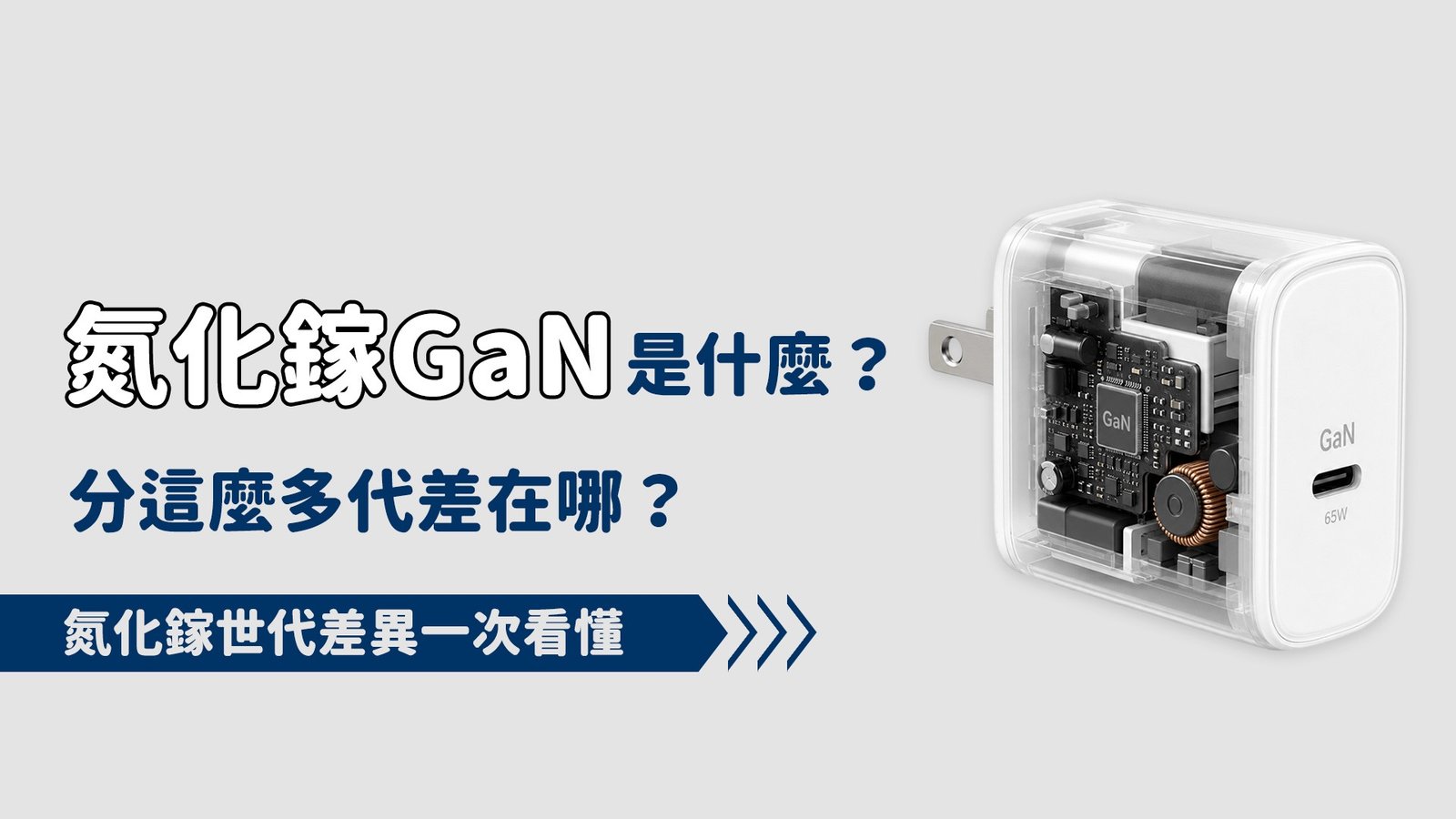
一、什麼是「氮化鎵」?
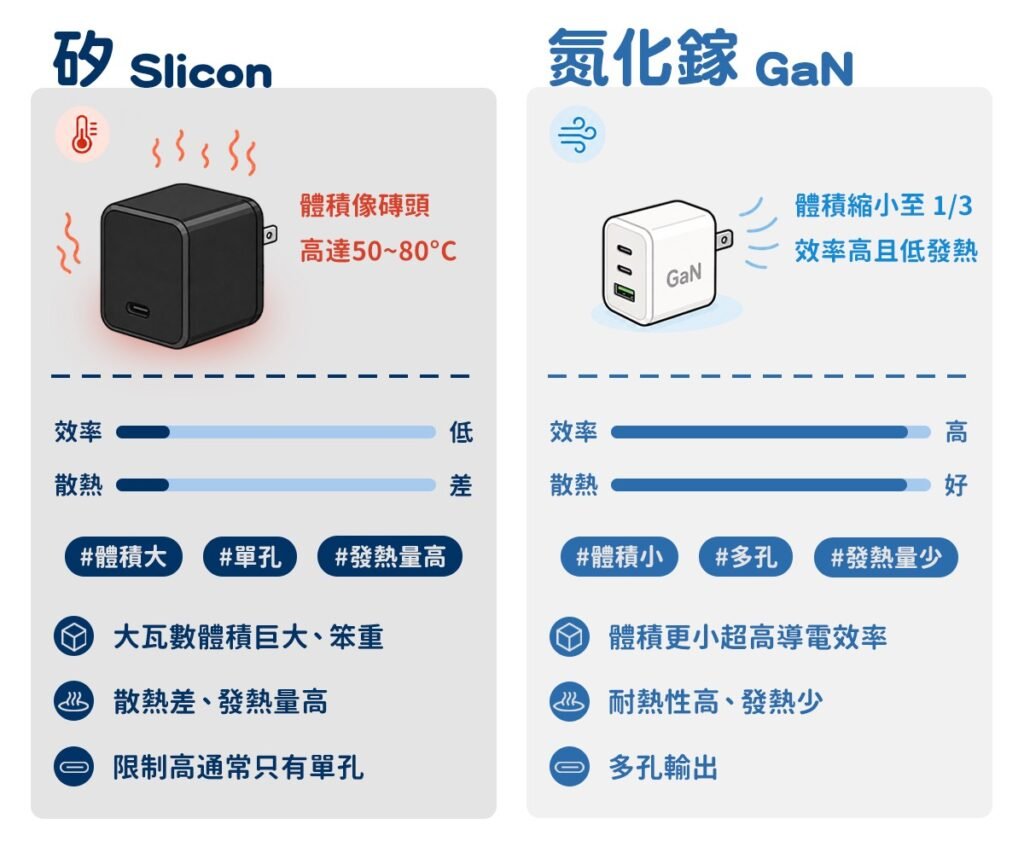
過去傳統充電頭大多使用「矽 (Silicon)」作為晶片材料,
在追求大瓦數(例如 65W、100W)時,矽充電頭為了散熱與安全,
體積就會變得像一塊「大磚頭」,而且充電時熱度高達50~80°C。
而氮化鎵 (GaN) 則是一種新型的半導體材料,
氮化鎵具備超高的導電效率和極佳的耐熱性,這帶來了兩個顛覆性的好處:
體積縮小
因為效率高、發熱少,原本像磚頭一樣大的 100W 充電頭,
可以縮小到只有原本的一半甚至三分之一。
多孔輸出
體積縮小後,廠商能塞入更多插孔和智慧電力分配晶片,
讓你出門帶一顆就能同時充筆電、手機和平板。
二、氮化鎵五代技術差在哪?
市面上標榜的「第幾代」氮化鎵,主要是指半導體晶片的技術演進與核心架構的升級。
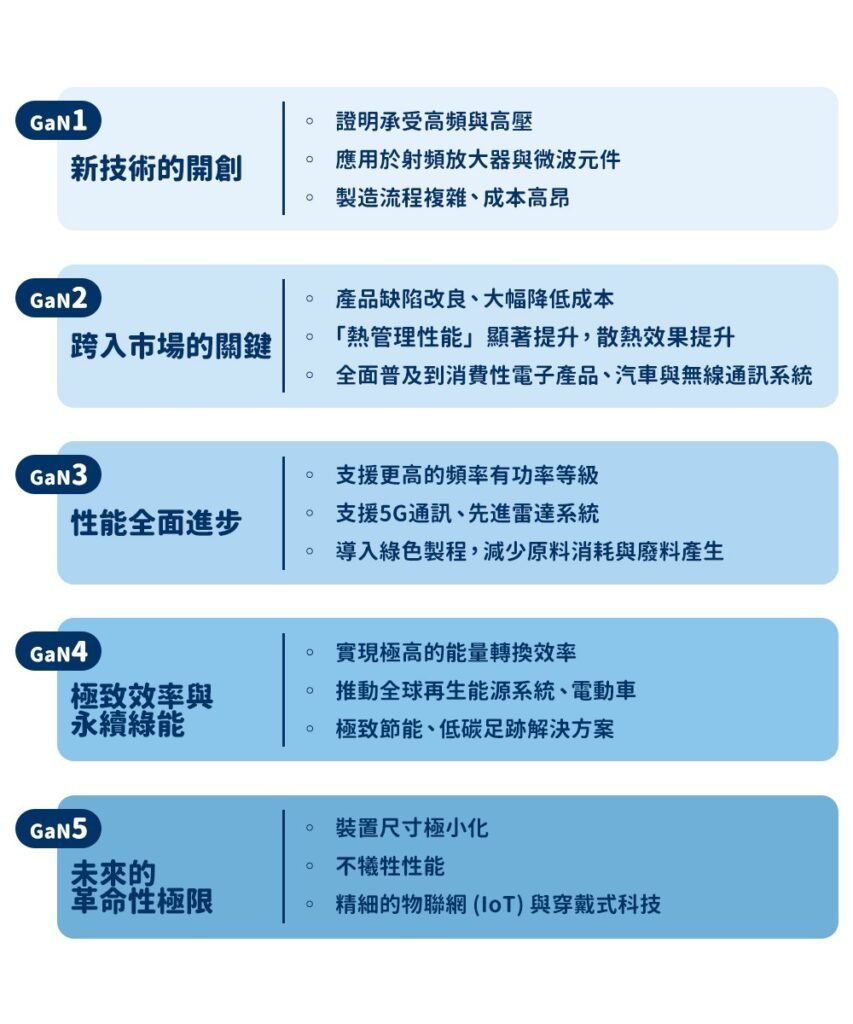
從實驗室走到你手上的充電頭,經歷了五個關鍵世代:
GaN 1:技術的開創
作為先驅世代,GaN1 率先證明了氮化鎵能承受比矽更高的電壓與頻率,早期被大量應用在射頻放大器與微波元件等專業市場。雖然跨出了關鍵的一步,但當時製造流程複雜、成本高昂,且面臨生產規模化的硬傷,因此並未普及到一般消費者的充電頭中。
GaN 2:跨入市場的關鍵
在初代基礎上,GaN2 迎來了爆發,這一代專注於缺陷改進,大幅降低了成本,並顯著提升了「熱管理性能」(散熱能力),提高功率的同時能保持出色的熱穩定性,氮化鎵裝置開始全面普及於消費性電子、汽車與無線通訊系統,我們在市面上買到早期的高 CP 值氮化鎵充電頭,大多是這一代的技術成果。
GaN 3:性能的全面進步
GaN3 在效能與功率密度上實現了巨大飛躍,它能夠支援更高的頻率與功率等級,因此成為 5G 通訊、先進雷達系統等尖端科技的理想選擇。更厲害的是,GaN3 開始導入綠色製造流程,減少原料消耗與廢料產生,在「卓越性能」與「環保永續」之間取得了完美的轉折平衡。
GaN 4:極致效率與永續綠能
GaN4 進一步壓榨了能量轉換的極限。它的核心特徵是大幅減少功率轉換過程中的能量損失,實現了極高的能量轉換效率。這項突破推動了全球再生能源系統與電動車的發展,對於要求「極致節能、低碳足跡」的公司與應用來說,GaN4 成了最理想的綠色能源解決方案。
GaN 5:未來的革命性極限
GaN5 代表著半導體技術的明日之星。它的目標是在完全不犧牲性能的前提下,進一步將裝置尺寸極小化。適合精細的物聯網 (IoT) 與穿戴式科技的需求,甚至未來有望與人工智慧 (AI) 和量子運作進行深度融合。
熱門好物

AD
熱門好物
AD


熱門好物
三、購買時該如何挑選?
看完上面一到五代的技術演進,你可能會想:「那我買充電頭是不是一定要找 GaN 5?」
其實不需要! 購買產品時,建議根據「需求瓦數」來挑選:
日常中低瓦數需求(20W ~ 65W)
如果只是想幫 iPhone、三星手機或輕薄型筆電充電,GaN 2 技術在體積與發熱控制上已經做得很完美。
此時盲目追求 GaN 4 或 GaN 5,不僅充電速度不會變快,體積感受不深,還會多花不少冤枉錢。
多設備大功率需求(100W ~ 240W 多孔裝置)
如果需要一顆充電頭同時插滿 MacBook Pro、平板、兩支手機,或是需要支援最新的 PD 3.1(140W 以上)頂規協議,這時高瓦數帶來的極端發熱與體積壓力,就會需要 GaN3 以上的 技術來幫忙。只有在大功率、極端縮小體積的場景下,最新世代的價值才顯現得出來。

AD

AD

AD
總結
氮化鎵只是幫充電頭降溫與減輕體積,並不決定充電速度。
決定手機充電快慢的,依然是我們在前幾篇提到的 [快充頭與快充線怎麼配最剛好?] 與 [傳輸線材的承載電流]。
挑選氮化鎵產品時,與其糾結哪代優異,不如翻到背面確認它的多孔電力分配規律是否符合你的設備需求。
買到「協議匹配、瓦數剛剛好、體積能接受」的產品,才是最聰明的消費者!
閱讀相關文章:數據傳輸線 規格 看不懂💡 5W 20W 65W 100W 240W 什麼意思?
閱讀相關文章:AirPods 全系列比較|功能、音質、價格完整解析
延伸閱讀
Is Your Samsung Charging at Full Speed? Decoding the “Secret Colors” of Your Charging Animation
As a Samsung user, have you ever paid close attention to the animation that pops up the moment you plug in your charging cable?
You might not realize it, but Samsung has hidden a very intuitive secret within the colors of that charging screen. It’s not just for aesthetics; the color on your screen indicates whether your current charger and cable are actually performing at their full potential. In this post, we’re skipping the complex data and getting straight to the point: teaching you how to “read the circles” so you can tell at a glance if your fast charging is hitting the mark!
Many people assume that as long as the “lightning bolt” appears in the battery icon at the top right, fast charging is working. However, to help users intuitively judge power delivery efficiency, Samsung designed a specific “Color Identification System.”
The color of the circular animation that flashes when you connect your cable is the direct result of the “handshake protocol” completed between your phone’s hardware and the charger. It is currently the most intuitive and accurate way to judge charging speed without using professional testing equipment.
If you’re chasing peak speeds and want to see that reassuring “Blue Circle,” you must ensure your accessories meet the required fast-charging standards and protocols. When buying accessories, don’t let mismatched cables or protocols throttle your flagship phone’s performance!