

目錄
2026 年科技圈最近討論度最高的筆電之一,絕對就是 MacBook Neo 。
不少人看到消息時第一反應都是:「這是新的 MacBook Air 嗎?」
其實不是。
MacBook Neo 並不是 Air 的後繼機,也不是 Pro 的簡化版,而是 Apple 全新開闢的一條 入門級 MacBook 系列。
一、入手 MacBook Neo 前必看 5 個重點
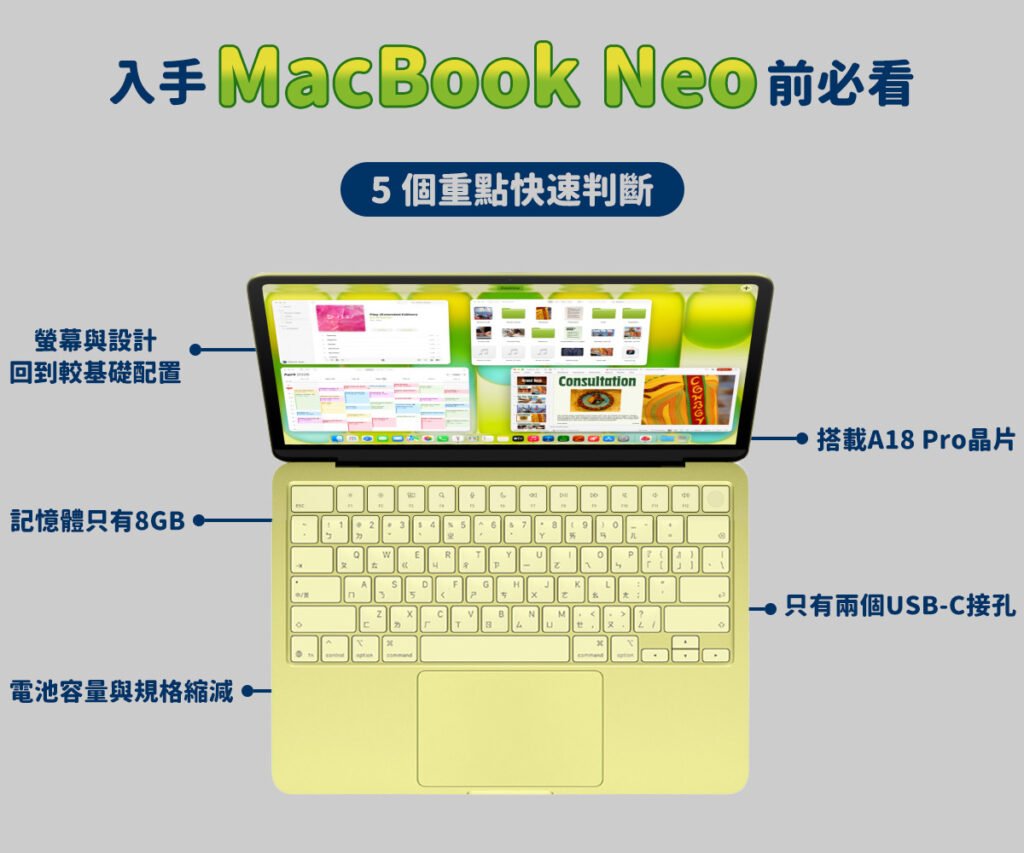
核心晶片:A 系列而不是 M 系列
MacBook Neo 最大的話題,就是 首次在 Mac 使用 iPhone 晶片。
它搭載的是 A18 Pro,也就是 iPhone 16 Pro 同款處理器。
這帶來兩種不同的看法:
優點
- 日常使用其實非常流暢
- 文書、追劇、上網都沒問題
猶豫點
- 效能仍低於 MacBook Air 的 M 系列
- 長時間高效能工作較吃力
所以如果你需要:
- 剪影片
- 修圖
- 開很多軟體
很多人就會開始猶豫要不要 直接買 Air。
記憶體只有 8GB
另一個讓很多人猶豫的點是:MacBook Neo 只有 8GB 記憶體,而且不能升級。
對於現在的使用習慣來說:
- Chrome 多分頁
- 同時開很多 App
- AI 應用
8GB 雖然現在還能用,但很多人會擔心:
用兩三年後會不會開始卡?
如果你是「分頁很多的人」,這點會是重要考量。
螢幕與設計回到較基礎配置
在顯示與外觀方面,MacBook Neo 也回到比較入門的設定。
螢幕雖然仍然是 13 吋 Liquid Retina,但只支援 sRGB 色域,並沒有提供 P3 廣色域。同時也取消了 True Tone 原彩顯示,螢幕不會依照環境光線自動調整色溫。
另外在外型上,Neo 採用 四邊等寬邊框設計,整體視覺風格比較接近 iPad,而不像 MacBook Air 近年的窄邊框設計。
對一般文書與娛樂使用影響不大,但如果是對色彩較敏感的使用者,可能會稍微猶豫。
連接與擴充能力被大幅縮減
MacBook Neo 的擴充能力也是不少人考慮的重點。
整台筆電只提供 兩個 USB-C 接孔,而且其中一個僅支援 USB 2.0 傳輸速度。這意味著在傳輸大型檔案時,速度可能會比較慢。
此外在擴充功能上也有所限制,例如:
- 不支援 Thunderbolt
- 最多只能外接 一台 4K 60Hz 螢幕
- 不相容 Apple Studio Display
電池容量與充電規格縮減
在電池方面,MacBook Neo 也採用了較小的電池容量。
雖然機身厚度比 MacBook Air 稍微增加,但電池只有 36.5Wh,明顯低於 Air 的 53.8Wh。
官方續航時間為:
- MacBook Neo:約 16 小時影片播放
- MacBook Air:約 18 小時
此外,Neo 也取消了幾個過去 MacBook 常見的功能,包括:
- MagSafe 磁吸充電
- 快速充電支援
因此只能透過 USB-C 進行一般充電,在便利性與充電速度上稍微遜色一些。
二、MacBook Neo優點

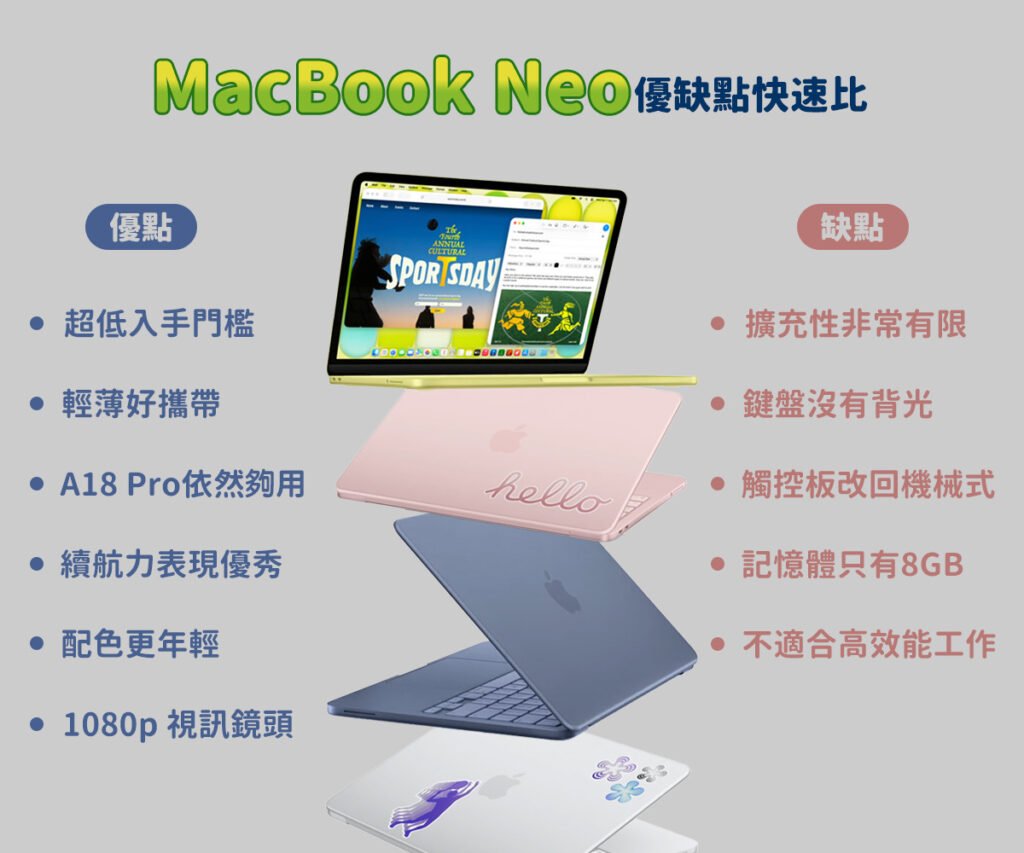
超低入手門檻
最大亮點就是價格。
MacBook Neo 的建議售價約:
- NT$19,900 起
如果搭配教育優惠,甚至可能只要:
- NT$16,900 左右
這也是目前 進入 macOS 生態系最便宜的 MacBook。
對於學生或第一次使用 Mac 的人來說,門檻大幅降低。
輕薄好攜帶
MacBook Neo 的重量約:1.23 公斤,比不少同級 Windows 筆電還輕。
對於每天需要:
- 背去學校
- 通勤
- 咖啡廳工作
的人來說非常友善。
A18 Pro 晶片依然夠用
雖然不是 M 系列晶片,但 A18 Pro 在日常使用依然流暢。
日常任務例如:
- 文書處理(Word、Google Docs)
- 簡報製作(PowerPoint / Keynote)
- 上網查資料
- 看 YouTube / Netflix
- 社群媒體
基本上都沒有問題。
整體性能大約落在:
M1 ~ M2 之間
對於輕度使用者其實已經足夠。
續航力表現優秀
A 系列晶片本來就以省電著稱。
MacBook Neo 官方續航:約 16 小時
也就是說:
- 一整天上課
- 外出工作
大多數情況下都 不用帶充電器。
配色更年輕
MacBook Neo 提供多種亮眼顏色,例如:
- 靛青色
- 胭粉色
- 橘黃色
相比 MacBook Pro 的商務感,Neo 看起來更活潑、年輕。
很明顯是鎖定:
- 年輕使用者
- 學生族群
1080p 視訊鏡頭
即使定位入門,Apple 仍然保留了:1080p FaceTime HD 鏡頭
對於:
- 視訊會議
- 線上課程
- 遠端工作
畫質依然清晰。
三、 MacBook Neo缺點
擴充性非常有限
MacBook Neo 最大的問題之一就是 接口太少。
機身只有:
- 2 個 USB-C
而且其中一個竟然是:USB 2.0(480Mbps)
這代表:
- 傳輸大檔案速度很慢
- 很容易需要 USB Hub
另外也缺少:
- ❌ Thunderbolt
- ❌ MagSafe
對於需要外接設備的人來說限制很大。
鍵盤沒有背光
這點讓不少人非常意外。
MacBook Neo 的鍵盤 沒有背光
如果你經常:
- 在宿舍
- 在飛機上
- 在咖啡廳晚上工作
使用體驗會受到影響。
觸控板改回機械式
高階 MacBook 使用的是:Force Touch 觸控板
但 MacBook Neo 為了降低成本改回:機械式按壓觸控板
差別包括:
- 按壓手感較硬
- 只有下半部能按
- 不支援「用力點擊」
如果你用過 MacBook Air 或 Pro,會很明顯感覺退步。
記憶體只有 8GB
MacBook Neo 全系列:只有 8GB 記憶體,而且 無法升級。
對於一般用途例如:
- 文書
- 影音
問題不大。
但如果你:
- 開很多瀏覽器分頁
- 同時使用多個 App
未來幾年可能會開始感覺到效能限制。
不適合高效能工作
由於採用:
- A18 Pro 晶片
- 無風扇設計
長時間高負載時容易出現:降頻
例如:
- 剪輯影片
- 3D 渲染
- 玩大型遊戲
這台筆電並不適合。
四、 MacBook Neo vs MacBook Air 比較
| 規格 | MacBook Neo | MacBook Air |
| 價格 | NT$19,900 起 | NT$35,900 起 |
| 晶片 | A18 Pro | M5 |
| 記憶體 | 8GB | 16GB 起 |
| 螢幕 | sRGB | P3 廣色域 |
| 鍵盤 | 無背光 | 有背光 |
| 接孔 | USB-C x2 | Thunderbolt x2 + MagSafe |
| 續航 | 約 16 小時 | 約 18 小時 |
五、MacBook Neo 值得買嗎?
老實說,這是一台 非常偏科的筆電。
適合買的人
- 預算 2 萬以內
- 只做文書與上網
- 想要第一台 Mac
- 需要一台輕便副機
不適合的人
- 需要剪片或修圖
- 對螢幕色彩要求高
- 需要很多外接設備
- 想用 4 年以上
這種情況其實更建議加一點預算買 MacBook Air。

總結 | MacBook Neo 值得買嗎?
Apple推出 MacBook Neo 的目的其實很明確:不是要取代 Air,而是要 搶攻中低價 Windows 筆電市場。
它確實砍掉了很多配備,但也換來一個非常吸引人的價格。
如果你的需求很單純,MacBook Neo 會是一台 便宜、輕便又好用的入門 Mac。
但如果你希望這台筆電能陪你 用 4~5 年,多花點錢升級到 MacBook Air,會是更長遠的選擇。
閱讀相關文章:iPhone 17e 值不值得買?|這 5 個重點讓人猶豫不決
閱讀相關文章:2026 蘋果春季發表會懶人包|7大亮點搶先曝光
延伸閱讀
5 Key Things to Know Before Buying MacBook Neo
1. Processor: A-series instead of M-series
Although the 17e has one fewer GPU core than the standard model (4-core vs 5-core), it still uses the latest 3nm A19 chip.
In real-world use:
- Apple Intelligence runs smoothly
- AAA mobile games perform flawlessly
- Daily multitasking is seamless
For most users, the performance difference compared to the iPhone 17 is almost unnoticeable.One of the biggest talking points of the MacBook Neo is that it’s the first Mac to use an iPhone chip.
It is powered by the A18 Pro, the same processor found in the iPhone 16 Pro.
This brings two different perspectives:
Pros
- Smooth performance for everyday tasks
- Great for document editing, streaming, and web browsing
Concerns
- Still less powerful than the M-series chips in MacBook Air
- Struggles with sustained high-performance workloads
So if you plan to:
- Edit videos
- Do photo editing
- Run multiple heavy apps
You might start wondering whether it’s better to go for a MacBook Air instead.
2. Memory Limited to 8GB
Another major concern is the memory configuration.
MacBook Neo only comes with 8GB of RAM, and it cannot be upgraded.
For modern usage, this includes:
- Multiple Chrome tabs
- Running several apps at once
- AI-related tasks
While 8GB is still usable today, many people worry:
Will it start to feel slow after 2–3 years?
If you’re someone who keeps many tabs open, this could be a key consideration.
3. Display and Design Are More Basic
In terms of display and design, MacBook Neo takes a more entry-level approach.
It still features a 13-inch Liquid Retina display, but only supports the sRGB color gamut, without the wider P3 color support.
It also removes True Tone, meaning the screen won’t automatically adjust color temperature based on ambient lighting.
Design-wise, Neo uses uniform bezels on all sides, giving it a look closer to an iPad rather than the slimmer bezels seen on recent MacBook Air models.
For general use like:
- Office work
- Streaming
this won’t make much difference. But for users who care about color accuracy, it might be a drawback.
4. Significantly Reduced Connectivity and Expansion
Connectivity is another area where compromises are noticeable.
The MacBook Neo only includes two USB-C ports, and one of them is limited to USB 2.0 speeds.
This means:
- Slower file transfers
- Higher reliance on external hubs
There are also several limitations:
- No Thunderbolt support
- Only supports one external 4K 60Hz display
- Not compatible with Apple Studio Display
On the wireless side, it supports Wi-Fi 6E, which is still solid for daily use. However, it does not include the newer Wi-Fi 7 standard.
If you frequently connect multiple devices or external displays, this could be a concern.
5. Battery and Charging Are Also Reduced
The screen glass is upgraded to the second-generation Ceramic Shield:
- 3x more scratch-resistant
- Anti-reflective coating
- Better readability outdoors
For outdoor users, this is a very practical improvement.MacBook Neo also makes compromises in battery capacity.
Despite being slightly thicker than the MacBook Air, it only includes a 36.5Wh battery, compared to 53.8Wh on the Air.
Battery life:
- MacBook Neo: Up to 16 hours of video playback
- MacBook Air: Up to 18 hours
While the difference isn’t huge, it may matter for users who rely on long battery life throughout the day.
In addition, several charging features have been removed:
- No MagSafe magnetic charging
- No fast charging support
As a result, charging is limited to standard USB-C, which is less convenient and slower compared to higher-end models.